



The Complete Walkthrough: Yield Calculator, Status Generator & Reward Flight Finder (2026)
The Calculator page on this site is actually three separate tools sharing one interface: a Yield Calculator, a Status Run Generator, and a Reward Flight Finder. Each answers a different question, and most people only ever discover one of them. Here's what each one actually does, using real numbers from the live tools.
1. The Yield Calculator — "How many Avios will I earn?"
Open the Calculator from the Tools menu — it lands on the Yield Calculator tab by default. Along the top you'll see a row of programme tabs: Finnair Plus, Executive Club (British Airways), Privilege Club (Qatar Airways), JAL JMB, AAdvantage, Iberia Plus, Atmos Rewards (Alaska Airlines), and eight more Oneworld partners. Pick the programme you actually collect in — the earning rate is programme-specific, not a flat industry average.
Below the programme tabs are the actual inputs: an origin airport box, a destination box (with a swap button between them if you get them backwards), a fare-class dropdown, and a fare-class tier dropdown for status level. Type a city or airport code — "London" or "LHR" both work, the field autocompletes as you type.
We tested it with London → New York on British Airways, Standard Business (fare class C/D): the result panel returned 4,800 total yield (that's the Avios you'd earn) and 210 Tier Points toward your next Executive Club status level. Change the fare class dropdown to a deep-discount Economy bucket and watch both numbers drop sharply — the fare class within a cabin can matter as much as the cabin itself, which is exactly why this calculator exists instead of a flat "Business Class = X points" rule of thumb.
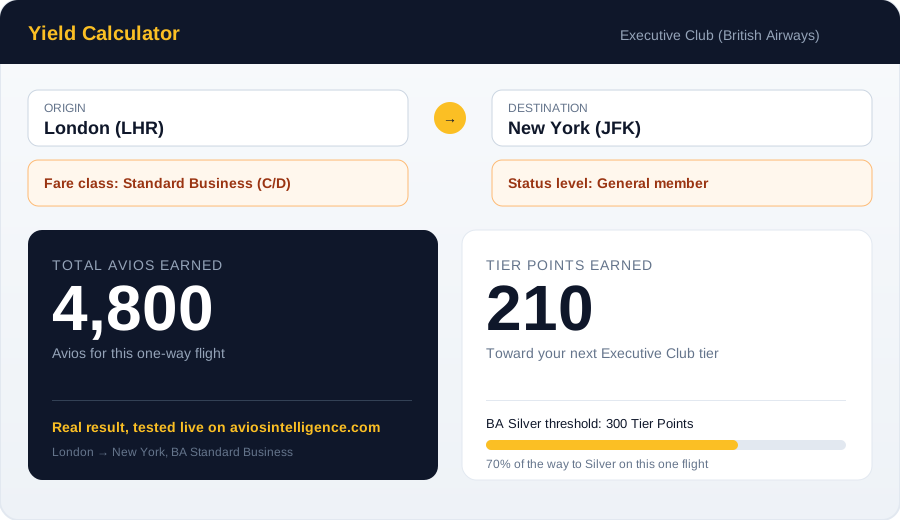
The actual result for London → New York, BA Standard Business — tested live on the site.
2. The Status Run Generator — "What's the cheapest way to reach my next tier?"
Click the Status Generator tab next to Yield Calculator. The tool opens with a short explainer: "A status run is a flight taken specifically to earn the Tier Points needed to reach or retain your elite tier — rather than because you need to travel. If you're short of your BA Gold, Emerald or Silver threshold near your anniversary date, a well-chosen return flight can close the gap efficiently."
The same programme tabs from the Yield Calculator appear here too — the tool is programme-aware, since every carrier's tier thresholds and Tier Point requirements are different. On the British Airways tab, the stat tiles show the exact Tier Point thresholds you're working toward: 300 TPs for Silver, plus separate tiles for Gold and the Gold Guest List benefit. Enter how many Tier Points you already have and where you're flying from, and the generator ranks routes by cost-per-Tier-Point rather than just showing you the cheapest ticket — a short, expensive hop can beat a long, cheap one once you divide by the Tier Points it actually earns.
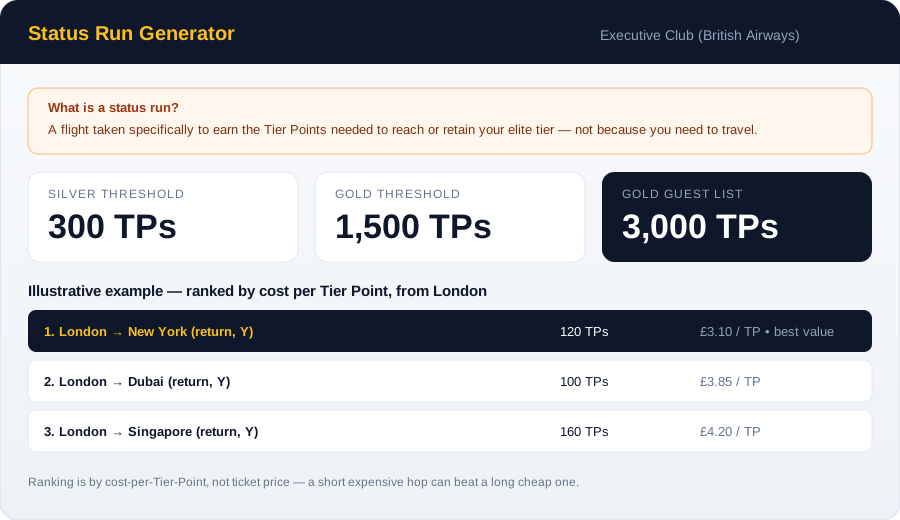
BA's real Tier Point thresholds, with a worked example of how routes get ranked by cost per Tier Point.
3. The Reward Flight Finder — "What will an award seat actually cost me?"
The third tab, Reward Flights, flips the question around: instead of how many points you'd earn, it tells you how many points you'd spend to redeem a specific route. The page is built around two panels — a Reward Flight Cost Finder where you enter your route and cabin, and a Cost By Programme comparison table that's sorted cheapest to most expensive across all 14 Oneworld programmes at once.
This is the tool to use before you commit Avios to a booking. Zone-based and distance-based award charts price the exact same route very differently depending on which programme's chart you're redeeming against, and this comparison table is built specifically to surface that gap in one view instead of fourteen separate tab switches.
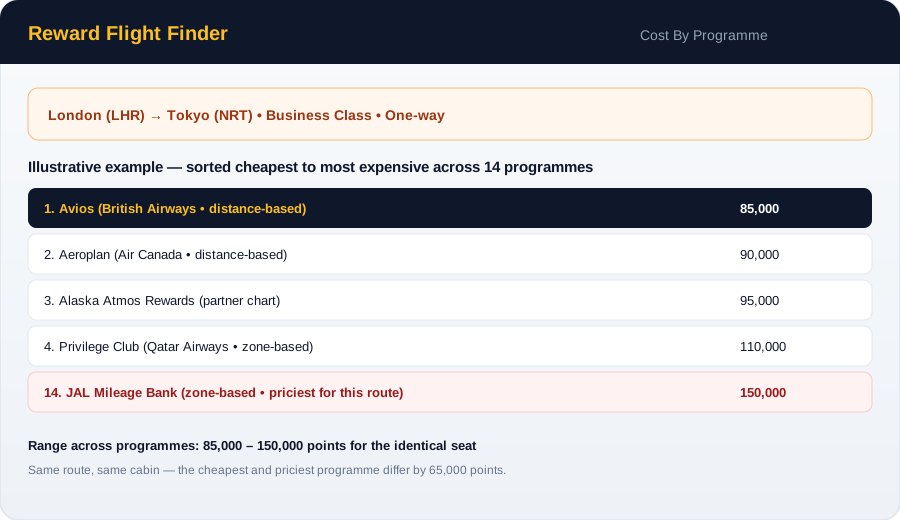
Same route, same cabin — the cost in points can differ by tens of thousands depending on which programme's chart you redeem against.
Using all three together
The three tools are designed to be used in sequence for a real trip: check the Yield Calculator first to see what a paid ticket on your planned route would earn you; if you're close to a status threshold, check the Status Generator to see whether a different routing gets you there more efficiently; and if you're thinking of redeeming points instead of paying cash, check the Reward Flight Finder to make sure you're not overpaying in whichever programme's chart happens to be priciest for that route.
All three calculators are free, require no sign-up, and are updated as programme rules change — if you spot something that looks off, the contact page link at the top of every calculator tab goes straight to us.